


Microsoft Excel remains embedded in the day-to-day operations of Australian businesses, but poor spreadsheet practices can leave workers spending unnecessary time on manual calculations, correcting data and rebuilding reports that could otherwise be automated.
Perth-based training provider ATI-Mirage who provides structured Excel training in Perth, says seemingly minor Excel habits can create larger productivity problems when spreadsheets are used repeatedly across a workplace.
“For businesses that rely on spreadsheets for financial reporting, administration, sales figures, inventory or operational data, inefficient practices can become more than an inconvenience.”
Repetitive manual work increases the opportunity for figures to be entered incorrectly, formulas to be overwritten or reports to become inconsistent.
Excel’s Hidden Productivity Problem Is Costing Businesses Time and Accuracy
Excel remains deeply embedded in modern business despite years of investment in dedicated finance platforms.
A September 2026 Parseur survey found 88% of business leaders had encountered errors in document-derived data at least sometimes, while 69% said they found errors sometimes, often or very often.
The findings underline why poor spreadsheet structure, manual data handling and formula mistakes can carry wider consequences than a single incorrect cell.
The pressure to improve data handling is also increasing as workplaces adopt more automation.
Microsoft’s 2026 Work Trend Index analysed trillions of Microsoft 365 productivity signals and surveyed 20,000 AI-using workers across 10 countries, highlighting how quickly routine office work is shifting towards automated systems and AI-assisted processes.
In that environment, basic Excel mistakes such as manual calculations, weak formula referencing and poor data structure increasingly risk becoming bottlenecks in otherwise automated workflows
Manual calculations remain a common problem
One of the most avoidable spreadsheet problems occurs when workers manually add figures, copy information between worksheets or update totals by hand.
A spreadsheet containing hundreds or thousands of entries can quickly become difficult to maintain when calculations depend on manual changes.
Excel formulas including SUM, IF and lookup functions allow information to be calculated or retrieved automatically when the underlying data changes.
ATI-Mirage says its Excel courses cover calculations and formulas, alongside sorting, filtering, tables and more advanced data analysis techniques.
For businesses, the distinction matters because automated calculations can reduce the number of repetitive changes employees need to make when preparing recurring reports.
Mouse-heavy workflows can quietly slow workers down
Another productivity issue is the amount of time spent navigating menus and moving between spreadsheet areas with a mouse.
Individually, the difference between clicking through menus and using keyboard commands may amount to only seconds. Across employees performing the same actions hundreds of times each week, however, those small delays can accumulate.
Keyboard navigation, selection shortcuts and commands for frequently repeated tasks can significantly reduce the number of steps needed to work through large spreadsheets.
Poorly structured data can cause bigger problems later
How spreadsheet data is arranged can also determine whether Excel’s more powerful features work correctly.
Merged cells, unnecessary blank rows, inconsistent formatting and numbers stored as text can interfere with sorting, filtering, formulas and data analysis.
A spreadsheet may appear visually organised while still being poorly structured for analysis.
The problem often becomes apparent only when another worker attempts to use the data for reporting, build a PivotTable or import the information into another system.
Formula references can create hidden reporting errors
Copying formulas across a spreadsheet can introduce another category of error when workers do not understand the difference between relative and absolute cell references.
A formula that produces the correct result in one cell can begin referencing entirely different values when copied into another area of a worksheet.
Hardcoding figures directly into formulas can create similar problems because later changes to the spreadsheet may not flow through automatically.
These errors can be particularly difficult to detect because the spreadsheet itself continues to operate. Unless somebody checks the underlying formula, an incorrect figure can remain inside a report without generating an obvious Excel error message.
PivotTables remain an underused analysis tool
Large spreadsheets also create problems when workers attempt to manually filter, count and reorganise data to produce summaries.
PivotTables can analyse thousands of rows and group information quickly, but they can appear complicated to workers who have never used them.
Once configured, the feature can rapidly summarise sales figures, expenses, transactions, customer information and other business data without modifying the original dataset.
5 Common Excel Mistakes and How Proper Training Can Help
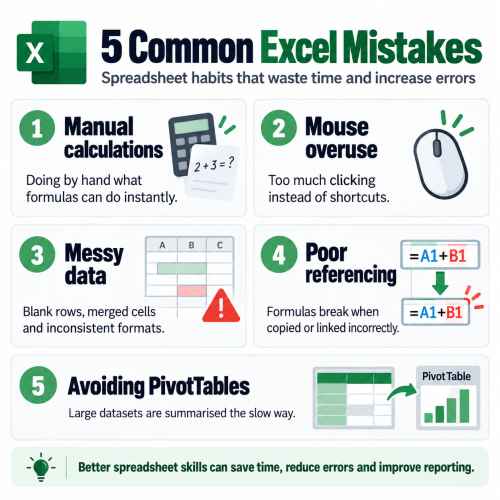
1. Doing manually what a formula could do
The single most common mistake is entering or calculating data by hand when a formula could do it instantly. Manually adding columns of numbers, retyping values across sheets, or updating totals by hand is slow and, worse, error prone. A single mistyped figure can flow through an entire report before anyone notices.
Proper training introduces the core functions that remove this risk, from SUM and IF through to lookup functions that pull data automatically. Learning when and how to use them turns a fragile spreadsheet into one that updates itself reliably.
2. Relying on the mouse instead of shortcuts
Many people navigate Excel entirely with the mouse, clicking through menus for actions they perform dozens of times a day. It feels normal, but it adds up to a significant amount of wasted time over a working week.
A good Excel course covers the keyboard shortcuts and navigation techniques that experienced users rely on. These small efficiencies compound quickly, and most people are surprised at how much faster they work once the habits are in place.
3. Messy, inconsistent data structure
Merged cells, blank rows, values stored as text, and inconsistent formatting are some of the biggest causes of frustration in Excel. They may look tidy, but they break sorting, filtering, and analysis, and they are a frequent reason formulas return errors or PivotTables refuse to work.
Training teaches the principles of clean data structure: keeping information consistent, avoiding merged cells in data ranges, and setting spreadsheets up so they can be analysed later. Building good structure from the start saves hours of rework down the track.
4. Formula errors from poor referencing
Formulas that work perfectly in one cell often break the moment they are copied elsewhere. This usually comes down to a misunderstanding of relative and absolute cell references, or from hardcoding values directly into formulas rather than referencing cells.
This is one of the areas where a guided Excel course in Perth makes the biggest difference. Understanding how references behave, and how to troubleshoot common errors, gives you the confidence to build more complex formulas without them falling apart.
5. Avoiding PivotTables and analysis tools
When faced with a large set of data, many users try to summarise it manually, copying, filtering, and counting by hand. PivotTables can do the same work in seconds, yet they are often avoided because they seem intimidating.
Hands-on training removes that fear. Once you have built a few PivotTables with guidance, summarising thousands of rows becomes one of the fastest and most useful things you can do in Excel, along with related tools for cleaning and visualising data.
Spreadsheet skills remain relevant despite increasing automation
The growing use of artificial intelligence and business automation has changed how companies process information, but spreadsheets remain deeply embedded in everyday business workflows.
That makes spreadsheet literacy an ongoing productivity issue for organisations that depend on Excel for reporting, administration and decision-making.
For employers, the broader issue is less about whether workers can open Excel and enter information, and more about whether they are using the software efficiently enough to avoid unnecessary manual work and prevent spreadsheet errors from finding their way into business reports.
With spreadsheets continuing to underpin everything from small-business bookkeeping to corporate reporting, seemingly minor Excel habits can become significant when repeated across an organisation
Excel remains deeply embedded in global business, with Microsoft reporting more than 450 million paid Microsoft 365 commercial seats in fiscal 2026.
With more businesses using Excel through Microsoft 365 alongside automated reporting and AI tools, errors in formulas or poorly structured data can spread into reports and business decisions much faster.